

Automated Scheduler for
labels and packaging
Most production schedulers treat every job as an independent block. Cadence scheduling engine understands print: tooling, substrates, shift windows, equipment groups, and the difference between setup time and run time.
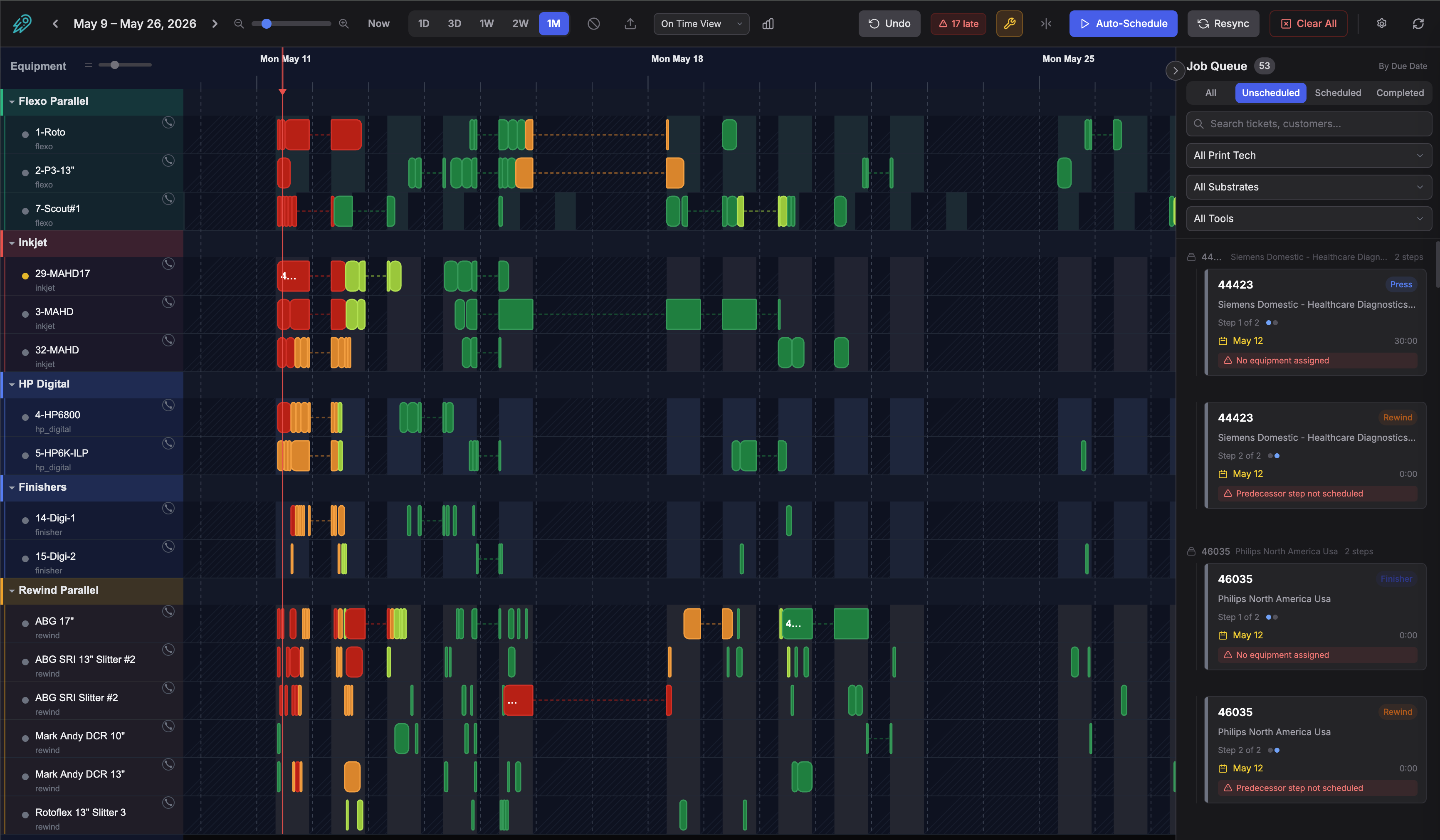
Shift-aware Gantt scheduling with drag-and-drop across presses, finishers, and rewinders
What makes this different from other schedulers?
Generic scheduling tools don’t understand print workflows. They can’t optimize tool changes, balance across press groups, or schedule around shift windows. This one does. Cadence also features an uncompacted view that reveals gaps in your schedule, a unique feature that lets you see exactly where idle time is hiding.
Compact & Uncompacted Views
Switch between a tightly packed schedule and an expanded view that reveals gaps between jobs. Idle press time is invisible in most schedulers. Here, you see exactly where time is being lost.
Tool Setup Optimization
When consecutive jobs use the same tooling, APEX automatically removes duplicate setup time from the schedule. Generic schedulers can't do this because they don't know what a tool change is.
Rule-Based Auto Scheduling
Define scheduling rules per press including priority, capabilities, exclusions, and buffer times. Hit auto-schedule and APEX places every job on the right equipment in the right order, respecting shifts, dependencies, and due dates.
Equipment Groups & Load Balancing
Group presses that can produce the same work. When auto-scheduling, APEX distributes jobs across the group based on availability and capability so you don't have to balance loads manually.
Shift-Aware Scheduling
Build shift schedules per press or location. Jobs are only placed during staffed hours, so you won't see overnight blocks on a single-shift press. Add block-out periods for maintenance, holidays, and PTO.
Full Drag & Drop
Move jobs between presses, reorder within a lane, and the schedule cascades automatically. Push-forward and pull-back gap filling keeps your timeline tight without manual cleanup.
See your schedule from every angle
Switch Gantt views instantly. Run reports without exporting anything.
On-Time View
Color-code every job on the Gantt by how close it is to its due date. Set custom thresholds for green, yellow, and red so you can spot risk before it becomes a problem.
Print Tech View
Color jobs by print technology (flexo, digital, hybrid, rewind, finishing). Instantly see your mix and identify bottlenecks by process type.
Equipment Utilization
See what percentage of staffed time is actually scheduled, broken down by presses, finishers, and rewinders with adjustable time windows.
Earliest Availability
Find the first open gap on every press that can fit a job of a given size. Configurable minimum gap so you're not scheduling into 30-minute slivers.
Lead Time / Backlog
How many days of work are queued on each press? Know your lead times per equipment so you can quote delivery dates with confidence.
Capacity Forecast
Daily or weekly view of scheduled vs. available hours per equipment category. See where you're overloaded and where you have room before your customers tell you.
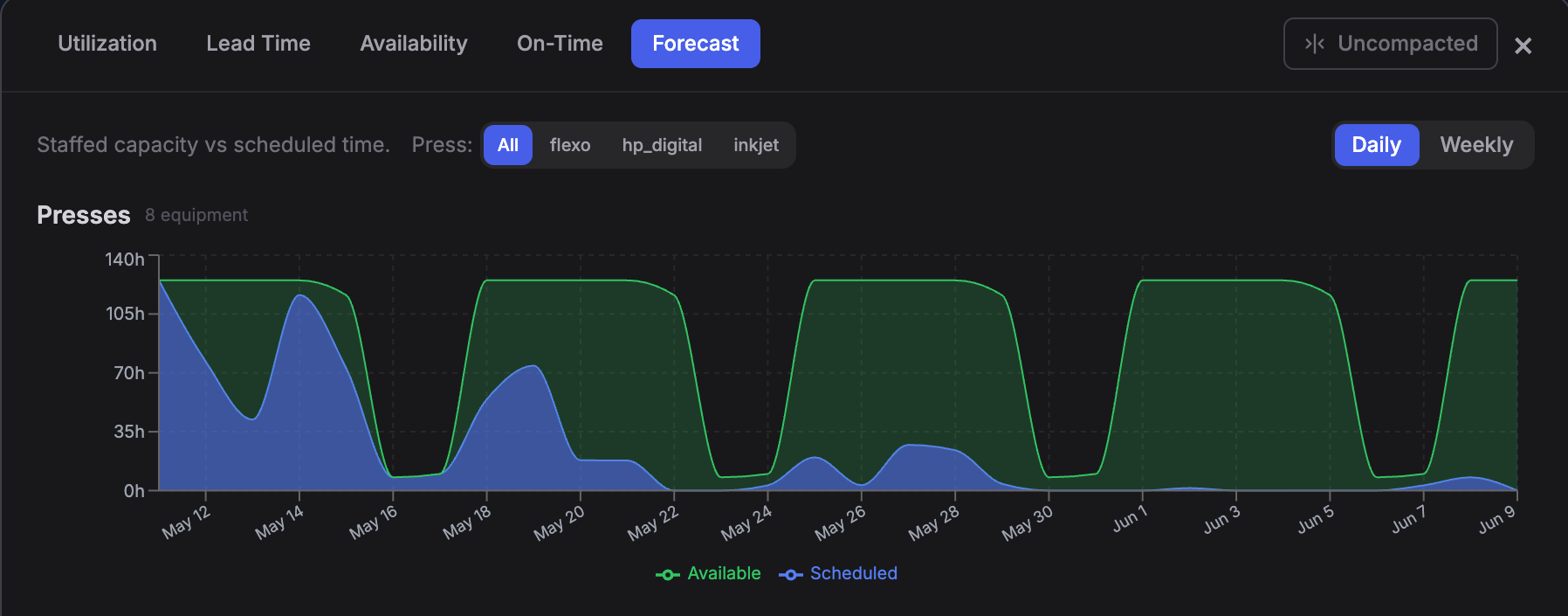
Capacity forecast showing scheduled vs. available hours across presses, finishers, and rewinders
Auto-schedule in seconds, fine-tune by hand
One click places every unscheduled job. Then drag to adjust.
What auto-schedule does
- Reads each job's assigned equipment or equipment group
- Checks press capabilities, exclusions, and shift windows
- Places jobs in due-date priority order within staffed hours
- Groups jobs by tool and/or material within a configurable day window to reduce setup changes
- Eliminates setup time for consecutive same-tool jobs and reflects the savings on the Gantt
- Runs a rewind/finisher pass after press scheduling
- Compacts gaps and fills idle time with a pull-forward pass
What you control
- Scheduling rules per press (capabilities, exclusions, buffer, tool/material grouping window)
- Shift schedules with day-of-week granularity
- Block-out periods for maintenance, holidays, and PTO
- Equipment groups for load balancing across presses
- Custom on-time thresholds for color coding
- Freeze zones to protect already-committed schedule blocks
Already using LabelTraxx?
Import your job data directly from LabelTraxx tab-delimited exports. Tickets, due dates, quantities, substrates, and tooling come in ready to schedule. No re-keying, no middleware, no IT project.
Use import as a bridge while you evaluate APEX, or run the scheduler standalone alongside your current ERP. When you’re ready to switch, your schedule history and equipment setup carry over.
- Tab-delimited file import (LabelTraxx format)
- Merge or replace modes for incremental updates
- Automatic ticket and step creation from import data
- Equipment mapping preserved across imports
Works with your data
LabelTraxx
Tab-delimited job export
Botson APEX
Native integration, tickets auto-sync
CSV / Custom
Flexible column mapping
Not just a Gantt chart
When connected to Botson Data Collection, your schedule becomes a live feedback loop.
Schedule
Estimated hours and footage from ticket specs set the production target
Collect
HMI tracks actual setup time, run time, and footage against the schedule
Complete
Jobs auto-complete on the schedule with actuals for reporting and comparison
Simple, transparent pricing
No per-user fees. No implementation costs. One flat monthly rate.
- Full Gantt scheduler with auto-scheduling
- Shift management and block-out periods
- Equipment groups and load balancing
- Tool setup optimization
- All reports and views included
- LabelTraxx import
See your entire production floor on one screen
Presses, finishers, and rewinders. Shift-aware, dependency-chained, and fully drag-and-drop. Import your jobs and have a working schedule in minutes.
Available as a standalone product or included with Botson APEX.